Multi-Agent Orchestration for End-to-End Ticket Resolution Across CRM, ERP, and Billing
A practical guide to multi-agent orchestration for resolving tickets end-to-end across CRM, ERP, and billing with control.
By Casey
Why multi-agent orchestration changes what “resolved” means
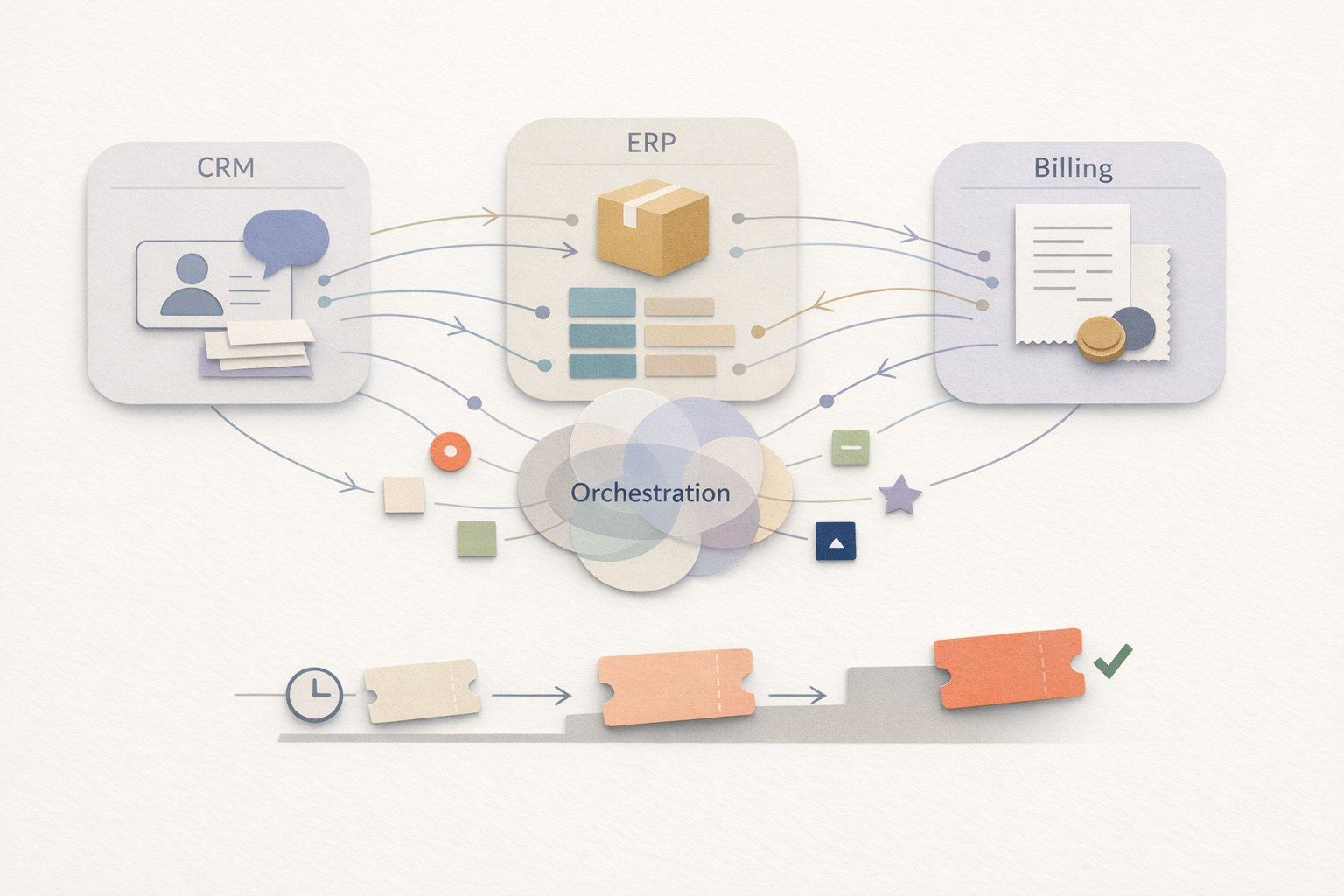
Most single-agent customer service chatbots are optimized for one thing: answering questions. They can summarize policies, quote help-center articles, and sometimes create or update a CRM ticket. But “end-to-end resolution” across CRM, ERP, and billing is different. It involves multi-step work that crosses systems, follows governance rules, and still has to feel coherent to the customer on any channel.
Multi-agent orchestration is a practical way to break that work into coordinated roles: one layer maintains the customer conversation and overall plan, while specialist agents execute domain-specific tasks such as billing corrections, order adjustments, or entitlement checks. Instead of a single model trying to do everything in one prompt, an orchestration layer manages task decomposition, tool usage, and approvals so tickets can be solved—not just answered.
Single-agent chatbots vs. multi-agent systems in real ticket flows
Where single-agent chatbots perform well
- Deflection and guidance: password resets, “where is my invoice,” policy explanation, simple troubleshooting.
- Summarization and drafting: turning a long thread into a clean agent note or a customer-ready reply.
- Basic ticket operations: opening a case, tagging intent, routing to a queue.
These are valuable outcomes, but they often stop short of the final state your teams care about: the underlying issue is fixed across operational systems, and the customer is updated with accurate, system-backed confirmation.
Where single-agent chatbots struggle in CRM–ERP–billing loops
- Tool sequencing: correct order of checks and writes across multiple systems (e.g., verify identity → check entitlement → validate invoice → issue credit → notify customer).
- State and context drift: long-running tickets spanning channels, with partial outcomes and changing data.
- Governance: approvals, audit trails, policy constraints, and safety gates before actions like refunds.
- Domain conflicts: what the CRM says may not match ERP fulfillment status or billing ledger reality.
Even strong models can produce plausible but wrong next steps if they lack controlled execution, structured constraints, and reliable grounding. The practical fix is not “a bigger prompt” but an orchestration pattern.
A practical playbook for orchestrated, end-to-end resolution
1) Classify the ticket into an executable workflow
Start with intent and “resolution class,” not just sentiment or topic. A return request, a disputed invoice, and an entitlement problem might all look similar in free text, but they require different actions and different systems.
In practice, your orchestrator should map incoming messages to a workflow template with explicit stages, required data, and allowed actions. This is where teams often benefit from a structured triage discipline similar to a product-feedback routing process—especially when requests are ambiguous or repeated across channels. If you already run formal triage, you can align the same thinking to support operations (see Feedback Triage Playbook for Deduping and Routing Product Requests).
2) Assign roles: supervisor plus domain specialists
A durable pattern is:
- Supervisor agent: owns the conversation, chooses the next step, enforces policy, and maintains a “case plan.”
- CRM agent: reads/writes case fields, contacts, entitlements, SLAs, and escalation routing.
- ERP agent: checks order/fulfillment status, returns eligibility, inventory constraints, shipment events.
- Billing agent: verifies invoices, payment status, credits/refunds, tax rules, and ledger constraints.
- Knowledge agent: grounds responses in approved sources and extracts policy clauses.
These roles can be implemented as separate agents or as separate “skills” with strict boundaries. The key is that each specialist has tight tool access and clear inputs/outputs. The supervisor coordinates and reconciles conflicts.
3) Ground every action in verified system state
For operational work, grounding is not only “retrieval from documentation.” It is also live system verification: querying CRM status, reading ERP fulfillment milestones, confirming the billing ledger, then proceeding. The orchestrator should require evidence for each write operation (e.g., “refund allowed because delivered on date X, within policy window Y, and invoice Z is paid”).
This is one reason multi-agent orchestration tends to be more reliable: it encourages explicit “read-before-write” steps and makes dependencies visible.
4) Use policy gates and approvals where risk is non-trivial
Refunds, credits, plan changes, and account updates can have compliance and revenue implications. A practical system defines automation tiers:
- Auto: low-risk actions with deterministic rules (e.g., resend invoice copy, update shipping address before fulfillment).
- Human-in-the-loop: the agent prepares the action and justification; a human approves.
- Escalate: for exceptions, high-value accounts, suspected fraud, or missing verification.
Multi-agent orchestration makes these gates enforceable. The supervisor can require approvals based on thresholds (amount, account tier, anomaly signals) rather than relying on the model to “remember” constraints.
5) Maintain cross-channel continuity as a first-class feature
Many tickets are not resolved in one sitting. Customers move from chat to email, WhatsApp, or social—and still expect the company to remember context. A multi-agent system should store a durable case state: what has been verified, what is pending, what actions were taken, and what evidence supports the next step. This reduces rework and prevents contradictory updates.
6) Instrument and evaluate like production software
Orchestrated systems are closer to distributed workflows than to a simple chatbot. They need traceability, automated evaluation, and simulation before rollout—especially when changing policies or tool access. Teams that already think in terms of job orchestration and observability will recognize the value of tracing and controlled deployments (see Migrating Cron Sprawl to Code-Defined DAGs With OpenTelemetry Traceability for the mindset, even if the domain differs).
Measure outcomes that matter: true resolution rate, reopen rate, time-to-resolution, approval latency, and quality/compliance checks—not just deflection.
How this maps to an AI agent platform in practice
Implementing orchestration from scratch is possible, but many teams prefer a platform approach so they can focus on workflows, policies, and outcomes rather than building connectors and governance layers. typewise.app is positioned around this exact problem: a multi-agent orchestration layer above existing systems that reads and writes across CRM, ERP, billing, ITSM, commerce, and knowledge sources. The design emphasis is operational control—workflow definition for business users, approvals and hybrid handoffs, grounded Knowledge & Actions, and outcome tracking—so the organization can automate safely while keeping humans in control where needed.
Common CRM–ERP–billing patterns where orchestration pays off
Returns and refunds
Determine eligibility (policy + order facts), confirm receipt/delivery status, initiate RMA in ERP, issue refund/credit in billing, update CRM, and send customer confirmation with reference IDs.
Billing disputes
Verify invoice and payment status, check contract/entitlements in CRM, confirm fulfillment in ERP, apply corrections in billing, and produce an auditable explanation.
Renewals and plan changes
Coordinate quotes, entitlements, billing changes, and customer communications while enforcing approval thresholds and timing constraints.
Implementation checklist for teams moving beyond single-agent bots
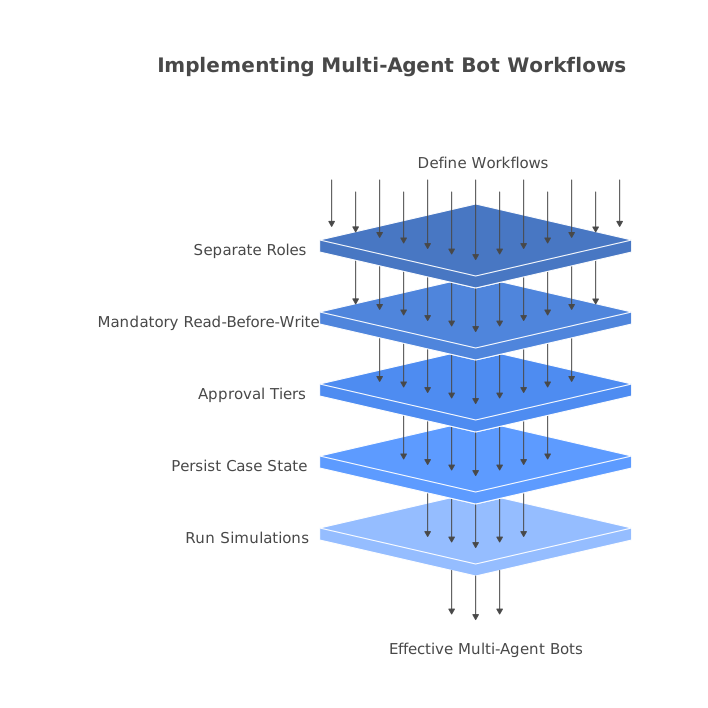
- Define 10–20 resolution workflows with required fields, systems touched, and success criteria.
- Separate roles (supervisor vs specialists) and restrict tool access per role.
- Make “read-before-write” mandatory and store evidence for key decisions.
- Implement approval tiers for risky actions and clear escalation rules.
- Persist case state across channels and sessions to avoid context resets.
- Run simulations and automated evaluations before policy or workflow changes go live.