The Bluebook Drift Check for Digital SAT Practice Tests
A 20-minute weekly routine to align drills with Bluebook so Digital SAT practice scores don’t drop on official tests.
By Casey
Why “Bluebook drift” causes score drops
Many Digital SAT students improve steadily during skill drills, then see their scores slip on official practice tests. That gap often isn’t about “not knowing the content.” It’s about a small set of behaviors that creep in when practice is done outside the Bluebook environment: timing habits, tool usage, reading posture, calculator decisions, and even how you review mistakes.
“Bluebook drift” is the accumulation of those mismatches. You’re training one set of instincts in drills, then being graded on a different set of instincts in Bluebook. The fix is not more full tests. The fix is a short, repeatable calibration routine that keeps your daily practice aligned with the official testing experience.
The protocol below is a 20-minute weekly check you can run every week until test day. It’s especially useful if you do most of your work in a prep app like getsharp and then switch to College Board practice tests for benchmarking.
The 20-minute weekly Bluebook Drift Check protocol
Run this once per week, ideally on the same day and time (e.g., Sunday afternoon). The point is consistency. Keep a simple log of what changed and what you’ll do differently next week.
Minute 0–2: Set “official conditions” in miniature
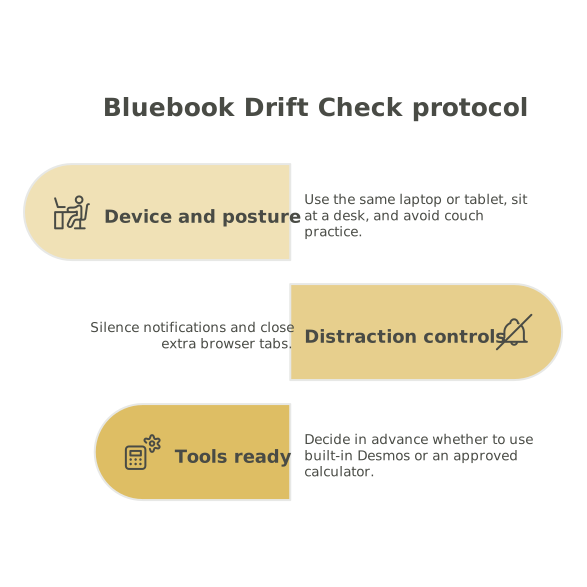
Before you answer anything, take two minutes to eliminate the most common sources of drift:
- Device and posture: Use the same laptop/tablet you’ll use for Bluebook when possible, sit at a desk, and avoid “couch practice.”
- Distraction controls: Silence notifications and close extra tabs.
- Tools ready: Decide in advance whether you will use the built-in Desmos and/or an approved calculator (whichever matches your test-day plan).
This step sounds basic, but it prevents a subtle timing illusion: drill environments feel faster when you are more relaxed, more distracted, and more willing to “peek” at hints or solutions.
Minute 2–7: Do a five-minute Bluebook micro-sprint
Open an official Digital SAT practice test in Bluebook and do a short sprint of only five minutes. The goal is not to complete a module. The goal is to observe your behavior under official UI constraints.
During the sprint, watch for drift signals:
- Over-scrolling and re-reading: The Bluebook interface changes how you move through text. If you re-read more than expected, you may need different annotation habits.
- Tool friction: Are you slower opening Desmos, creating a table, or resetting a graph than you are during drills?
- Answer-change behavior: Do you second-guess more in Bluebook than you do in app-based practice?
Stop exactly at five minutes, even mid-question. You’re calibrating, not “proving” your score.
Minute 7–12: Compare your process to your drill process
Immediately after the sprint, write down a quick comparison using a three-line template:
- What felt slower in Bluebook? (e.g., copying values into Desmos, navigating reading passages, checking work)
- What felt riskier in Bluebook? (e.g., misclicks, losing your place, timing anxiety)
- What felt different about your decisions? (e.g., you chose algebra where you normally graph, or you guessed earlier than usual)
Most score drops come from decision drift: you are still capable of the math or comprehension, but you’re choosing less efficient paths under official constraints.
Minute 12–16: Run a two-question “UI alignment” retake
Pick two questions from the micro-sprint that you answered incorrectly or felt uncertain about. Retake them, but with a strict aim: align the method to what is fastest and most stable in Bluebook.
Examples of UI-aligned adjustments:
- Desmos-first rule (when appropriate): If your drill habit is algebra, but Bluebook makes graphing faster, practice switching to Desmos earlier.
- Answer verification rule: If you tend to change answers impulsively, require a concrete trigger for changes (e.g., “I found a specific arithmetic error” or “I tested a value and it contradicts my result”).
- Reading navigation rule: If you lose your place, adopt a consistent scan pattern (question first vs. passage first) and keep it fixed for a full week.
This is where an adaptive platform helps: after you identify a drift pattern (say, quadratic modeling), you can immediately schedule targeted practice in getsharp to reinforce the method you intend to use inside Bluebook.
Minute 16–20: Lock one weekly adjustment into your study plan
End the check by choosing one adjustment to implement for the next week. Keep it singular. If you try to change everything, you change nothing.
Good weekly adjustments are behavior-based, not motivational:
- Timing rule: “If I’m stuck for 45 seconds, I switch methods or guess and move.”
- Tool rule: “I will use Desmos for all linear systems unless a mental shortcut is obvious.”
- Error-tag rule: “I will label misses as ‘setup,’ ‘execution,’ or ‘choice of method’ after every drill set.”
Make that rule visible in your practice environment. If you track skills and errors, treat it like a lightweight “feedback loop” that keeps training aligned with the measurement. (If you enjoy systems thinking, the logic mirrors how teams avoid mismatched signals when building metrics-driven workflows, similar to a feedback handshake workflow.)
How to spot Bluebook drift early
The best time to fix drift is before it shows up as a score drop. Watch for these early indicators:
- Drills feel easy, Bluebook feels rushed: often a timing model issue (too much time per item, especially on early questions).
- Accuracy is fine, but you leave questions blank: often a navigation or pacing habit, not a content gap.
- You make “new” mistakes only in Bluebook: often tool friction (Desmos, highlighting, scrolling) or stress-triggered answer changes.
When you see one of these, your next week of practice should prioritize alignment over volume: fewer total questions, but more questions done with the same tools and pacing you’ll use on test day.
Making the protocol work with an adaptive study routine
The Bluebook Drift Check is not meant to replace your main prep. It is a calibration layer that keeps your main prep honest.
A simple weekly rhythm looks like this:
- Most days: targeted drills (weak skills, mixed sets, explanation review) in getsharp.
- Once per week: the 20-minute drift check inside Bluebook.
- Every few weeks: a full-length official practice test to benchmark endurance and score.
If you use analytics, consider tracking “method choice” as a skill of its own. Two students can know the same algebra but differ by 80–120 points because one consistently picks the fastest stable method in the official interface. That is a trainable advantage.
What not to do when scores dip on official practice tests
- Don’t immediately reset your entire study plan: first determine whether the drop came from drift (process) or gaps (content).
- Don’t add more full tests as a reflex: more tests without alignment can reinforce the wrong habits.
- Don’t blame “test anxiety” without evidence: many “anxiety” problems are actually tool and timing problems that show up under official constraints.
Use the protocol to separate content issues from environment issues. Once you can name the drift pattern, you can fix it quickly and keep your scores stable as you move between drills and official Bluebook tests.