Shadow AI and Bring-Your-Own-Agent Risk Controls for Browser-to-SaaS Access
Control Shadow AI by enforcing browser-to-SaaS least privilege with Zero Trust access and inline DLP data boundaries.
By Casey
Shadow AI and bring-your-own-agent risk is now a browser problem
“Shadow AI” used to mean unsanctioned model usage. In 2026 it increasingly means unsanctioned agents: browser-based copilots, extensions, desktop wrappers, and automation tools that can read pages, scrape SaaS UIs, and trigger actions using a user’s live session. The risk is not only that data leaves the organization, but that the organization no longer controls where data can flow, which identities can act, and what an agent is allowed to do inside critical SaaS apps.
Because many of these tools operate “inside the browser,” they bypass traditional network choke points. Least privilege, therefore, has to be enforced closer to the interaction layer: the browser-to-SaaS path, the session itself, and the data being copied or uploaded.
Threat model for BYO agents in SaaS workflows
1) Over-broad identity and session reuse
Agents often piggyback on a user’s active session, inheriting all the permissions of that user, including high-risk scopes like admin consoles, finance, HR, and production dashboards. If the agent is compromised, misconfigured, or simply too capable, it becomes an ungoverned “second operator” with the same access as the employee.
2) Data boundary failures through copy/paste and file movement
Even if the agent cannot directly call APIs, it can still exfiltrate through normal user gestures: copying CRM records into prompts, uploading CSVs to external tools, or exporting internal pages into documents. The leakage path is mundane, which makes it hard to detect after the fact.
3) Action execution without strong intent verification
Agents can click buttons, change settings, and run destructive flows (mass deletes, permission changes, key rotations) without a second factor or a human “are you sure?” checkpoint. If the SaaS has weak step-up authentication, an agent can quietly become an automation backdoor.
4) Shadow toolchains and fragmented audit trails
When work happens across a browser extension, a consumer AI app, and multiple SaaS tabs, auditability fractures. Security teams are left correlating logs across IdP, device posture tools, and SaaS audit events—often too late to prevent leakage.
Enforcing least privilege browser-to-SaaS with zero-trust access
Zero Trust for SaaS is most effective when it is applied at three levels: identity, device/session, and application path. The objective is not to ban AI agents—most organizations will not succeed at that—but to constrain their blast radius so that the default outcome of experimentation is limited exposure.
Use identity-aware access as the first gate
Start with a policy engine that can evaluate who the user is, what groups they belong to, and what they are trying to reach. This is where Zero Trust access controls can replace coarse VPN-style access. If the user is not in the correct role, the browser never gets a valid path to the SaaS app in the first place.
Practical patterns include:
- Role-based SaaS access (e.g., finance SaaS only for finance groups, admin consoles only for admin groups).
- Just-in-time elevation for sensitive panels rather than permanent admin access.
- Service boundary segmentation so “read-only users” can’t reach write-capable endpoints.
Add device posture and session controls to stop risky agent environments
BYO agents frequently run on unmanaged devices or personal browser profiles. A Zero Trust posture check can require minimum standards (managed device, disk encryption, OS version, endpoint protection) before allowing access. Equally important: enforce session duration limits and re-authentication for high-risk actions.
When designing posture checks, treat “browser context” as a risk signal. For example, a managed corporate browser profile can be allowed broader access than an unmanaged profile. This reduces the chance that a consumer-grade extension becomes the de facto automation layer for confidential workflows.
Constrain SaaS permissions and tokens used by agents
Where the SaaS supports it, avoid letting agents act through the user’s full permissions. Prefer separate “agent accounts” with explicit scopes, short-lived tokens, and narrowly defined capabilities. If agents must use user sessions, compensate by narrowing what those sessions can reach and by requiring step-up verification for state-changing actions.
Inline DLP to keep data boundaries intact at the moment it moves
Least privilege reduces what can be accessed; Data Loss Prevention reduces what can leave. Inline DLP is specifically valuable for Shadow AI because it evaluates content during common exfiltration paths—uploads, form submissions, and copy/paste-like interactions—when prevention is still possible.
Focus DLP on high-signal flows, not everything
A practical program starts with the data movements most often used for prompts and agent workflows:
- Uploads to third-party web apps (files, screenshots, exported CSVs).
- Text submission in web forms (prompt boxes, chat inputs, support tools).
- Downloads from core SaaS into unmanaged endpoints.
Use detectors that match your real exposures: regulated data types (PII, PHI), secrets (API keys), and proprietary identifiers (customer IDs, invoice numbers). Then define outcomes that are realistic: block, redact, warn with justification, or require approval.
Pair DLP with “allowed destinations” and exception handling
Shadow AI adoption is often driven by speed. If the policy is only “no,” users route around it. A stronger pattern is to define approved AI destinations and business tools, then enforce boundaries for everything else. Exceptions should be time-bound, ticketed, and reviewable—especially for teams that handle customer data.
Putting it together as a zero-trust + DLP reference architecture
Teams typically converge on an architecture that looks like this:
- Access layer: Identity-aware policies decide whether a user can reach a SaaS app at all, and under what conditions.
- Session layer: Device posture, re-authentication, and session lifetime controls reduce the risk of long-lived, silently reused sessions by agents.
- Data layer: Inline DLP inspects sensitive flows (uploads and submissions) and enforces “stop, redact, or justify” controls at the moment data is moving.
- Audit layer: Centralized logs correlate identity events, access decisions, and DLP outcomes for investigations and continuous tuning.
This is one reason organizations look at integrated platforms rather than stitching together point tools. Cloudflare’s Zero Trust and security services are often evaluated in this context because they can combine policy enforcement and data protections on a single global network footprint. For a high-level reference point on the broader platform, see cloudflare.com.
Operationalizing the program without breaking productivity
Start with a “least-privilege map” for critical SaaS
Pick 3–5 SaaS apps that represent the majority of sensitive workflows (CRM, support, HR, finance, source control). For each, document: who needs access, which roles are high-risk, and which user actions are irreversible. This becomes the blueprint for both Zero Trust rules and step-up checkpoints.
Define agent categories and handle them differently
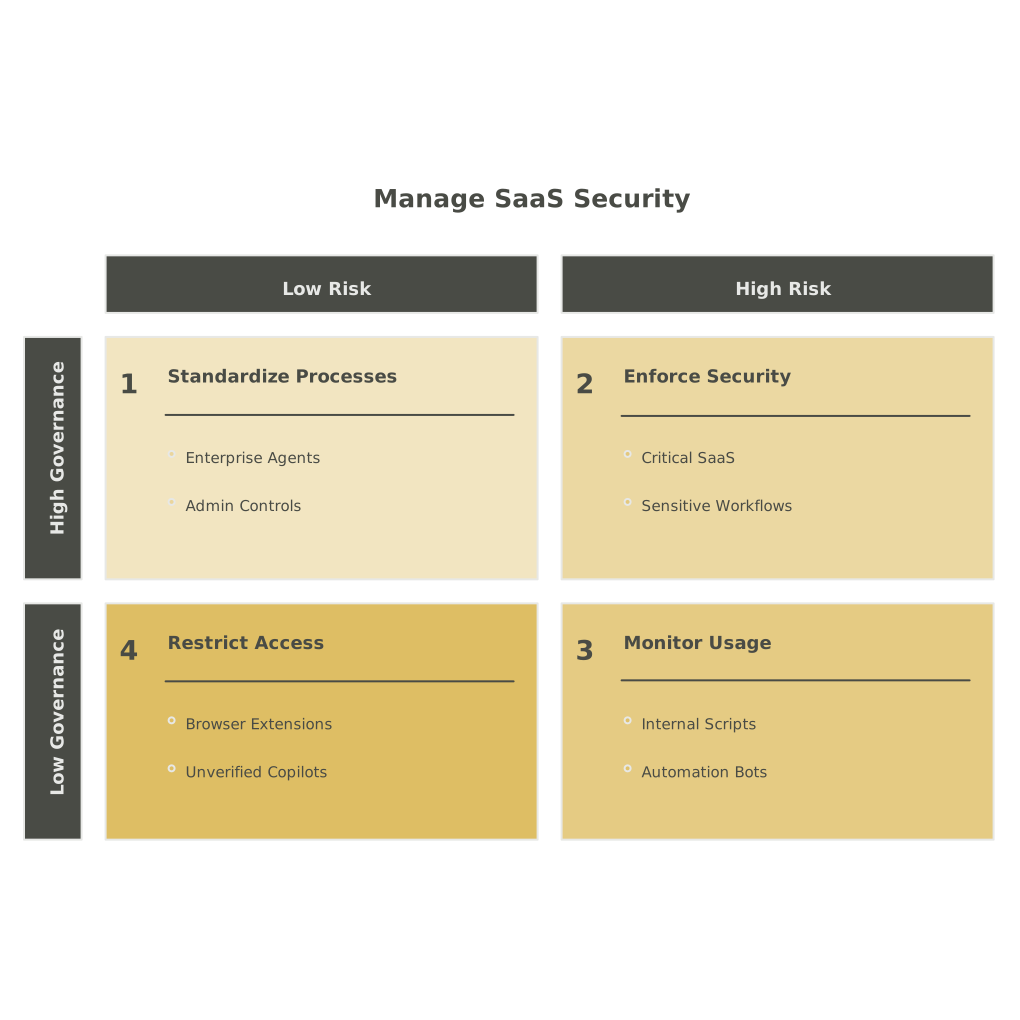
Not all agents are equal. Separate:
- Approved enterprise agents with governed connectors and admin controls.
- Browser extensions and copilots with unclear data handling.
- Internal automation (scripts and bots) where you can enforce code review and secret management.
If you are deploying internal agents broadly, it helps to treat them like production software with consistent observability and controls. A useful related perspective is covered in Deploying AI Agents at Scale With Cloudflare Agent Cloud.
Use a feedback loop so policies don’t calcify
DLP and access rules need tuning. Capture “false positives,” new business flows, and changing team responsibilities. Mature programs route these signals into a structured workflow rather than ad hoc exceptions. If your organization struggles with request sprawl and inconsistent context, the idea of building a unified request identity is relevant; see Building a Feedback Identity Graph.
What “good” looks like for Shadow AI containment
The goal is measurable control, not perfect prevention. In a healthy setup, employees can still use AI to accelerate work, but:
- They cannot reach sensitive SaaS surfaces from unmanaged or risky environments.
- State-changing actions in critical apps trigger step-up verification.
- Sensitive data cannot be casually pasted or uploaded to unapproved destinations.
- Security has a single trail of access decisions and data boundary events to investigate incidents.
That combination—browser-to-SaaS least privilege, Zero Trust access, and inline DLP—turns “Bring Your Own Agent” from an uncontrolled experiment into a governable operating model.