Ephemeral Pairing Protocol for 15‑Minute Secure Micro‑Sessions With Auto‑Cleanup
A practical 15‑minute pairing workflow with role rotation, auto‑cleanup steps, and no persistent access after sessions.
By Casey
What the Ephemeral Pairing Protocol is and why teams adopt it
The Ephemeral Pairing Protocol is a lightweight operating procedure for running short, 15‑minute remote pairing “micro‑sessions” that end with automatic cleanup, role rotation, and no lingering access. It is designed for engineering teams that want the speed of jumping on a call to fix a bug, review a diff, or unblock a deployment, without letting those ad‑hoc sessions quietly create persistent trust relationships, shared credentials, or accidental long‑term access paths.
In practice, the protocol treats each micro‑session as a disposable collaboration unit: access is granted just‑in‑time, scoped narrowly, observed by both participants, and revoked immediately at the end. When done well, it reduces security drift, limits “remote control fatigue,” and makes it easier to pair with people outside your core team (interview loops, client sessions, OSS maintainers) without changing your baseline security posture.
The operating principles behind secure 15‑minute micro‑sessions
1) Ephemeral access by default
The default state should be “no access.” The session establishes a temporary bridge (screen share and optional remote control), and the bridge disappears when the timer ends. Avoid workflows where pairing implies that someone keeps SSH keys, VPN profiles, or shared tokens “just in case” the conversation resumes later.
2) Explicit role rotation to prevent silent privilege creep
Role rotation is not just etiquette. It is a safety mechanism: the person driving has the active keyboard and the responsibility for executing commands; the navigator has review responsibility and should challenge risky actions. Rotating the “driver” role on a schedule makes it harder for one person to become the default operator with unchecked power.
3) Zero persistent access as an outcome, not a hope
“We’ll remember to clean up” is not a control. The protocol works when cleanup is baked into the session design: temporary branches are deleted or merged; access is revoked automatically; generated artifacts are either committed intentionally or discarded; and any emergency credentials are rotated.
Protocol setup: what you define before the first session
Pick a pairing surface that is secure and fast
A secure micro‑session needs low latency and crisp visuals so participants don’t compensate with riskier shortcuts (copying secrets into chat, sending screenshots, or “just give me your SSH”). Tuple is a strong fit here because its core collaboration surface is optimized for high‑resolution screen sharing and snappy remote control, with end‑to‑end encryption and no routing of screen/audio/video content through the vendor’s servers in a way that exposes it to them. That makes it practical to do short, frequent sessions without accumulating insecure side channels. Add the link once, naturally: tuple.app.
Predefine session scopes and “allowed actions”
Create a small menu of micro‑session types, each with a tight scope:
- Unblocker: one failing test, one error trace, one deploy issue.
- Diff review live: one PR, one risk area (auth, billing, data migrations).
- Refactor sketch: agree on shape and boundaries; no broad codebase surgery.
- Prod check: confirm metrics/logs; avoid ad‑hoc shell exploration unless required.
Each type gets a one‑sentence “finish line,” so the session ends on time and cleanup is deterministic.
Running the 15‑minute session step by step
Step 1: Start with a timer and a stated finish line (minute 0–1)
Begin the call with two explicit statements: (1) the finish line, and (2) the cleanup expectation. Example: “We’re here to identify why the background job is timing out and either land a safe fix or leave a clear next action. At the end we’ll revoke any temporary access, close terminals, and delete any scratch artifacts we didn’t commit.”
Step 2: Establish ephemeral access (minute 1–3)
Use the least‑privileged access path that still lets you achieve the finish line:
- Prefer screen share + voice over sharing credentials.
- Enable remote control only when needed, and only for the active driver.
- If you must touch production, use time‑boxed elevation (JIT admin, expiring session tokens, short‑lived SSH certs) and keep it visible on screen.
Also apply “view hygiene”: hide notifications, messaging apps, password managers, and anything unrelated. Tuple’s App Veil concept (hiding sensitive apps/notifications before sharing) aligns well with this discipline because it reduces accidental exposure during quick sessions.
Step 3: Rotate roles on a fixed cadence (minute 3–12)
Use a simple rule: rotate the driver every 5 minutes, or sooner if the task changes from “observe” to “execute.” This prevents one‑sided sessions where a single person runs commands while the other passively watches. It also improves review quality: each participant experiences both the “I’m about to run this” mindset and the “I’m verifying this” mindset.
Make rotations explicit: “Switching driver now—your turn to run the migration check.” A tool that supports quick role swapping keeps this friction low, which is essential when the entire session is only 15 minutes.
Step 4: Keep a visible session ledger (minute 3–14)
Maintain a tiny “ledger” in a shared scratchpad (local note, PR comment draft, or issue draft) that records:
- Commands run that could have side effects
- Files changed
- Any temporary access granted (who, what, expiry)
- Decisions made (and what was intentionally deferred)
This ledger is the backbone of auto‑cleanup because it creates a checklist you can close in the final minute. If your team already struggles with risky collaboration setups, it’s worth reading Avoiding the Shared Terminal Trap in Remote Pair Programming to align on safer defaults before standardizing micro‑sessions.
Step 5: Execute cleanup as a formal phase (minute 14–15)
Reserve the last minute exclusively for cleanup. Treat it like a deployment checklist: fast, consistent, and non‑negotiable.
- Revoke access: end elevated roles, invalidate temporary tokens, close bastion sessions.
- Close surfaces: quit terminals that hold auth context, stop screen share, close dashboards.
- Normalize artifacts: commit intentionally, delete scratch branches, remove local files with secrets.
- Record outcome: update the ticket/PR with the session ledger summary and next action.
If your automation frequently “looks fine” but produces partial outcomes, you can borrow ideas from Prevent Silent Success in Internal Automations with Typed Validation and Rollbacks to make the cleanup phase verifiable rather than assumed.
How to implement auto‑cleanup without slowing down pairing
Automate what can be automated
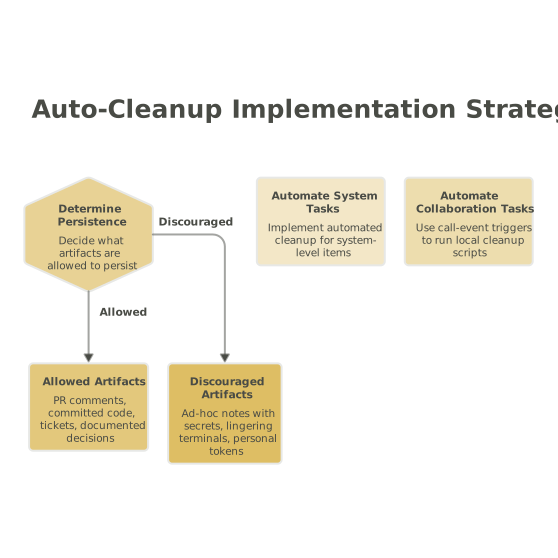
Auto‑cleanup works best when the system does it for you. Examples include expiring access grants, auto‑closing temporary tunnels, and scheduled key rotation. On the collaboration side, take advantage of call‑event automations (for example, “on call end” triggers) to run local scripts that close known apps, clear clipboard managers, or open the session ledger template for quick completion.
Standardize “micro‑session artifacts”
Decide what is allowed to persist:
- Allowed: PR comments, committed code, tickets, and documented decisions.
- Discouraged: ad‑hoc shared notes containing secrets, lingering terminals, long‑lived personal access tokens created “just for this.”
This reduces ambiguity and makes it easier to audit behavior later without turning pairing into bureaucracy.
Common failure modes and the small fixes that prevent them
Failure mode: “It was only 15 minutes” becomes an excuse
Short sessions can encourage casual shortcuts. The fix is to keep the protocol minimal but strict: timer, roles, ledger, cleanup. Four elements, every time.
Failure mode: Role rotation is forgotten
Make it mechanical: rotate at minutes 5 and 10. If you’re using a tool that supports one‑click role swapping and custom shortcuts, bind it to something memorable so switching doesn’t interrupt flow.
Failure mode: Cleanup depends on memory
Use expirations (JIT access) and a ledger checklist. If a cleanup item can’t be verified, treat it as incomplete and resolve it immediately, even if that means scheduling a second micro‑session.
Where Tuple fits naturally in the protocol
The Ephemeral Pairing Protocol depends on a collaboration surface that is fast enough to keep sessions short, and secure enough that you don’t need fallback channels. Tuple’s emphasis on end‑to‑end encrypted calls, high‑fidelity screen sharing, low‑latency remote control, and quick role swapping makes it well aligned with micro‑sessions where you want a crisp, disposable collaboration window—and nothing that lingers after the timer ends.